

Home Blog Page 2

3 Tips for Getting the Most Out of Your iPhone Camera

The iPhone camera has evolved into a powerful tool for photography, rivaling traditional cameras in functionality and convenience. Whether you’re capturing everyday moments or composing artistic shots, here are three essential tips to help you maximize the capabilities of your iPhone camera. Let’s dive in.

Master the Camera Settings

Understanding and utilizing the built-in settings of your iPhone camera can significantly improve the quality of your photos. Experiment with different modes like Portrait for depth effect, Night mode for low-light conditions, and Pano for panoramic shots. Familiarize yourself with exposure adjustments by tapping on the screen and sliding up or down to darken or lighten your photos before capturing them. 

Use the Rule of Thirds

This principle suggests dividing the frame into nine equal segments with two horizontal and two vertical lines. Aim to place the most important elements of your scene along these lines or at their intersections. This technique helps in creating more balanced and engaging images. You can turn on the grid in your camera settings to make this easier.

Explore Advanced Photography Apps

While the native Camera app is quite effective, third-party apps can offer more advanced controls and creative options. Apps like Halide allow for manual focus, exposure settings, and RAW capture, which provides higher-quality images for editing. 
3 Reasons Animation is a Skill Worth Learning

Animation is more than movie magic. It’s a gateway to boosting your creativity, spicing up your resume, and even changing the way you share ideas. Whether you’re doodling stick figures or dreaming of crafting the next big animated feature, learning animation is a journey worth embarking on. Let’s explore three compelling reasons to start animating today!

Enhances Creativity and Problem-Solving

Animation pushes the boundaries of creative expression. It allows you to bring abstract concepts and imaginative stories to life. It also improves problem-solving skills as you figure out how to translate ideas into visual narratives. Whether you’re crafting intricate character animations or simple explainer videos, you’ll constantly be devising solutions and overcoming artistic challenges.

Increases Employability in Various Industries

The demand for skilled animators extends beyond the entertainment industry. With digital media’s growth, animation skills are valuable in marketing, advertising, web development, and education. Knowing how to create engaging animated content can set you apart in the job market and open doors to diverse career opportunities.

A Fun Way to Communicate and Educate

Animation is an effective tool for communication and education, able to explain complex ideas in an accessible and engaging manner. It’s widely used in instructional videos, educational games, and online courses. Learning animation allows you to create content that educates, informs, and entertains.

3 Marketing Secrets of Apple’s Success

Apple Inc. is not just a technology company—it’s a phenomenon that has mastered the art of branding and marketing. In fact, Apple’s marketing strategy is a textbook example of how to create demand and build a loyal customer base. Here are three secrets behind Apple’s phenomenal success in marketing.

Simplicity in Everything

Apple’s philosophy of simplicity is evident in every aspect of its marketing, from clean product design to straightforward, compelling advertisements. Apple’s advertising copy is famously concise, often showcasing their products with minimal text. This simplicity makes their messages clear and accessible.

Creating an Ecosystem

One of Apple’s most powerful marketing strategies is creating an interconnected ecosystem of products and services. Once you purchase an iPhone, you’re more likely to buy a MacBook, iPad, or subscribe to services like iCloud or Apple Music, because they all work seamlessly together. This interconnectedness encourages brand loyalty and repeat purchases. 

Product Launches as Events

Apple has turned product launches into blockbuster events. The buzz begins long before the launch with rumors and leaks, building anticipation. By the time of the actual event, which is staged with the precision and excitement of a Hollywood premiere, Apple has the undivided attention of not just tech enthusiasts but mainstream media as well. 

Brief Guide for Taking Amazing Travel Photos in Crowded Tourist Locations

A visit to popular tourist attractions such as the Eiffel Tower and the Colosseum is incomplete if you don’t take an amazing photo for your Instagram, but that is easier said than done. Taking good photos at crowded tourist locations isn’t an easy task and this brief guide will help you get it done.

Early Bird

Most crowded places tend to be less busy early in the morning. Get there early if you want a good photo—you won’t have to deal with big crowds and morning light will give wonderful quality to your photos.

Different Angles

Crowded places will inspire you to experiment with your camera, and try out many different angles that allow you to take photos that don’t put big crowds front and center. Shooting upwards or getting some close-ups is always a great idea when you’re in crowded places.

Portrait Mode

If your camera offers portrait mode, you should put it to some good use. It will blur out the commotion around you, while still making it obvious where you are when taking photos at popular tourist attractions.

Be Patient

Good travel photos can’t be rushed. Give it time, try as many times as you can, and wait for the crowds to clear up from your preferred spot if you want your Instagram page to truly pop.

3 Creative Ideas for Your Lock Screen

Your phone’s lock screen is the first thing you see when you pick up your device. Why not make it fun, functional, and inspiring? With a few creative tweaks, your lock screen can serve more than just a security feature. Here are three creative ideas to personalize and make the most out of your lock screen.

Personal Dashboard

Transform your lock screen into a personal dashboard that not only looks good but also keeps you informed. Use widgets or custom settings to display essential information like your daily schedule, weather updates, and fitness goals. This setup personalizes your lock screen and enhances its functionality, making your day-to-day activities more manageable.

Interactive Backgrounds

Say goodbye to static wallpapers and hello to interactive backgrounds. Use live wallpapers that change with the time of day or react to your touch. Some phones allow you to set up a rotation of pictures for your camera roll as your background. 

Inspirational Quotes 

Turn your lock screen into a source of daily inspiration by setting it with uplifting quotes. You can use apps that automatically change the quote or artwork daily, keeping your lock screen fresh and inspiring. Choose themes that resonate with your personal goals or moods. 

How to Generate Illustrations Using AI

Artificial Intelligence (AI) has become a transformative tool, empowering artists and designers with new ways to create. AI-powered illustration tools are particularly exciting, giving users the ability to generate unique, creative visuals quickly and efficiently. Whether you’re a professional graphic designer, an artist, or just someone interested in creative technologies, here’s a quick guide on how to get started.

Choose an AI Art Generator

Select a platform that suits your creative needs. Popular options include DeepArt, DALL-E by OpenAI, and Artbreeder, each offering different capabilities and styles.

Understand the Tool’s Capabilities 

Familiarize yourself with your chosen tool’s strengths and limitations. Platforms vary in their specialties, such as photorealistic outputs or abstract designs. Take a look at galleries and tutorials for each generator to understand what’s possible.

Input Your Parameters

AI tools typically require inputs like textual descriptions, base images, or specific style adjustments. Tools like DALL-E use detailed text prompts, while DeepArt transforms uploaded images using selected artistic filters.

Refine Your Results

Utilize available options to tweak and perfect your illustration. This may involve adjusting parameters or blending images to achieve the desired effect.

Export Your Illustration 

Once satisfied, export your artwork in the appropriate format and resolution for your intended use, whether personal or commercial.

Best Tools to Use For Building Your First Website

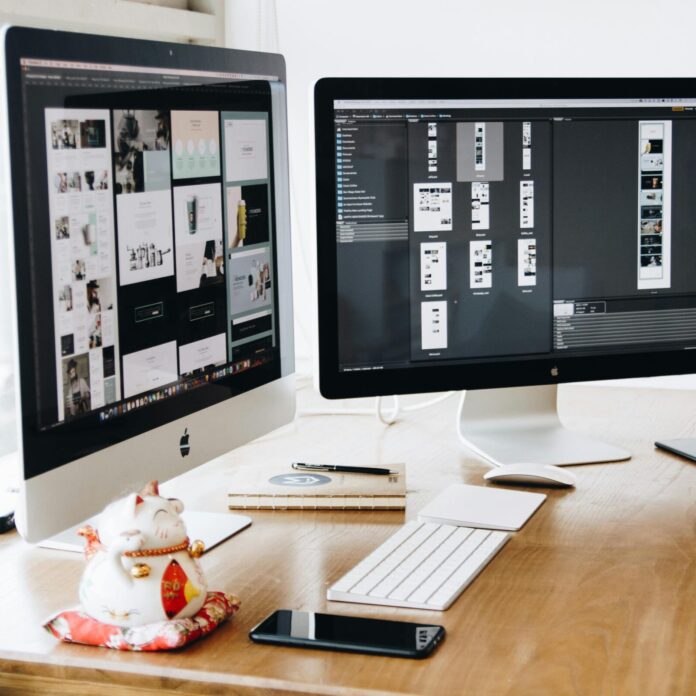
Two Imac's With Keyboard and Phones on Desk
Photo by Tranmautritam via Pexels

Ever wondered how people build professional-looking websites from the ground up? It’s not as hard as it looks! With the right tools in hand, anyone can create a stunning website without needing to learn a line of code. Let’s talk about some user-friendly tools that can turn your website dreams into reality.

Wix

For beginners, website builders like Wix and Squarespace provide an intuitive, user-friendly way to create a professional-looking website without needing to know how to code. Wix has a drag-and-drop interface with over 500 customizable templates, making it suitable for virtually any type of website. 

WordPress

WordPress powers over 35% of the internet, making it the most popular CMS around. While it has a steeper learning curve than Wix or Squarespace, WordPress offers greater flexibility and customization options. You can choose from thousands of themes and plugins to extend the functionality of your site, from SEO enhancements to social media integration and beyond. WordPress is ideal for those who want more control over their site’s design and capabilities.

Canva

These tools are excellent for creating your website graphics, from logos to banners. Canva’s drag-and-drop interface makes it simple to design graphics, even if you have no prior design experience. 

SAKO Architects’ Vibrant Buildings Will Take You to Colorful Paradise

Founded by visionary architect Keiichiro Sako, SAKO Architects grew into one of Asia’s most inventive architecture firms in the past two decades. They’re taking the world by storm with their colorful buildings, and here are three that have to be seen to be believed.

Kaleidoscope – Tianshui

SAKO Architects built several educational centers all around China, but none of them compares to this kindergarten in the small provincial town of Tianshui. Its windows and railings are covered with 438 pieces of colored glass, and their rainbow-like shades create a perfect contrast with the white exterior.

Columns – Shenzhen

SAKO Architects’ interiors are as impressive as their exteriors, and the foyer of Shenzhen Bay Sports Center Stadium is a case in point. The atrium is decorated with 500 pencil-like structures in all the colors of the rainbow, meant to create a vibrant centerpiece that connects the whole space together.

Vertical Rainbow – Tokyo

Tokyo is home to countless show-stopping buildings, and SAKO Architects are responsible for at least one of them. They used in-house paint for outdoor glass to transform an ordinary office building in Tokyo into a colorful oasis, and it’s a true delight to watch the sunlight hit its windows, illuminating each room with bright, colorful light.